

FOSSBilling generates invoice PDFs with Dompdf, which renders HTML and CSS into a printable document.
CSS Limitations
Section titled “CSS Limitations”Dompdf is not a complete PDF engine. FOSSBilling uses Dompdf 3.x, which supports many print-friendly CSS features but still has layout limitations:
| Supported | Not Supported |
|---|---|
| CSS 2.1 and some CSS3 | Flexbox |
@import, @media, @page | CSS Grid |
CSS custom properties and math functions such as calc() | Browser-style complex layouts |
| Basic positioning and table layouts | Splitting table rows or cells across pages |
Custom CSS
Section titled “Custom CSS”Creating a Custom Stylesheet
Section titled “Creating a Custom Stylesheet”- Copy
/modules/Invoice/templates/pdf/default-invoice.css - Paste as
/modules/Invoice/templates/pdf/custom-invoice.css
FOSSBilling automatically uses custom-invoice.css if it exists.
CSS Classes Reference
Section titled “CSS Classes Reference”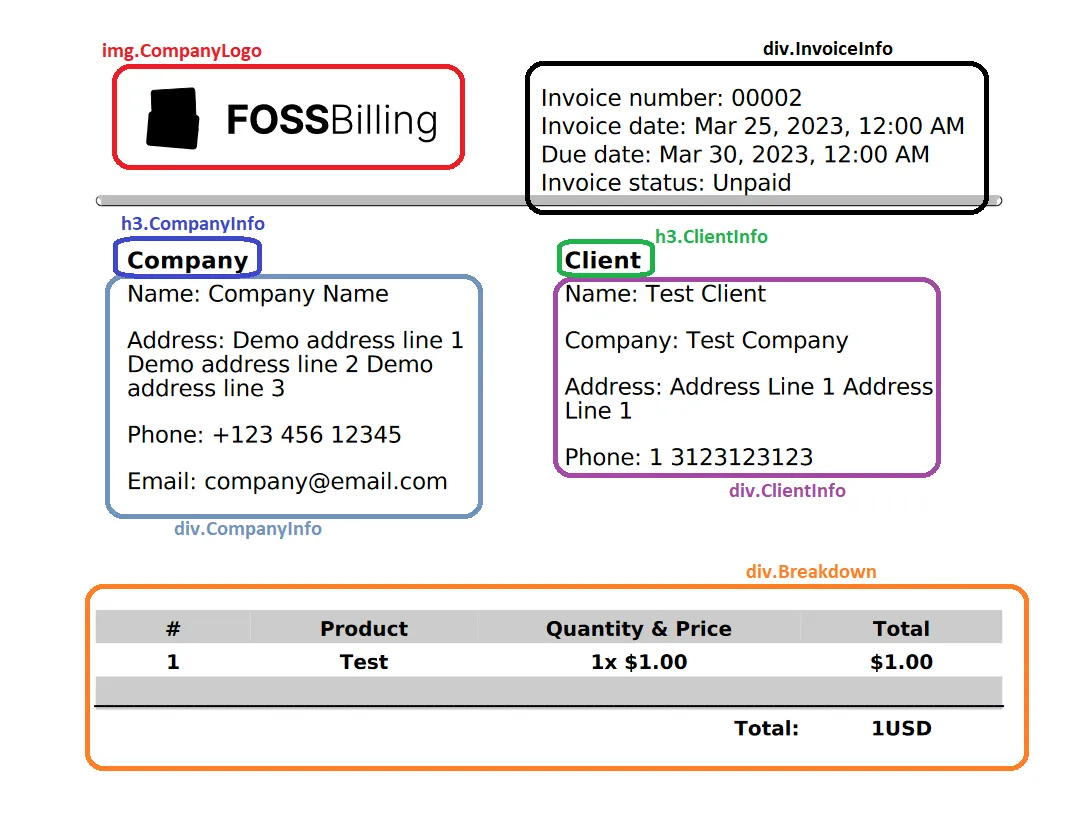
The default stylesheet uses these classes:
.CompanyLogo— Company logo image.TopSectionDivider— Divider below the header area.InvoiceInfo— Invoice number, dates, and status.CompanyInfo— Seller/company heading and details.ClientInfo— Client heading and details.Breakdown— Line items, tax, discount, and total table.InvoiceText— Custom invoice text blocks.InvoiceFooter— Payment details, company footer, and signature.muted-text— Muted footer signature text
Custom HTML Template
Section titled “Custom HTML Template”Customize the HTML structure by adding a custom Twig template.
Creating a Custom Template
Section titled “Creating a Custom Template”- Copy
/modules/Invoice/templates/pdf/default-invoice.twig - Paste as
/modules/Invoice/templates/pdf/custom-invoice.twig
FOSSBilling uses custom-invoice.twig automatically.
Template Variables
Section titled “Template Variables”Available in PDF templates:
| Variable | Description |
|---|---|
currency_code | Invoice currency code for format_currency. |
css | Contents of custom-invoice.css or default-invoice.css, inserted into the template's <style> block. |
logo_source | Resolved company logo source. This can be a local path, a remote URL, an SVG data URI, or an empty string. |
seller | Display-ready seller/company lines keyed by labels such as Name, Address 1, Phone, and VAT Number. |
seller_lines | Number of seller lines used by the default template for layout calculations. |
footer | Company footer details, including company name, bank details, address fields, email, phone, VAT/company number, website, and signature. |
buyer | Display-ready buyer/client lines keyed by labels such as Company, Name, Address, City, Country, Phone, and VAT Number. |
buyer_lines | Number of buyer lines used by the default template for layout calculations. |
invoice | Full invoice API array. Line items are in invoice.lines; raw buyer, seller, and client data are in invoice.buyer, invoice.seller, and invoice.client. |
The PDF renderer does not provide top-level client, company, or currency variables. Use invoice.client, seller/footer, and currency_code instead.
Example: Add a Custom Header
Section titled “Example: Add a Custom Header”<div class="custom-header"> <img src="{{ company.logo_url }}" alt="{{ company.name }}"> <h1>{{ 'Invoice'|trans }} #{{ invoice.serie_nr }}</h1></div>Twig Filters
Section titled “Twig Filters”PDF templates support the same Twig filters available elsewhere in FOSSBilling:
{{ invoice.total|format_currency(currency_code) }} {# Format as currency #}{{ invoice.created_at|format_date }} {# Format the invoice date #}{{ invoice.text_1|default('')|markdown_to_html }} {# Render invoice text as HTML #}Testing Changes
Section titled “Testing Changes”- Make your edits to
custom-invoice.cssorcustom-invoice.twig - Generate a test invoice
- Download the PDF
- Review the output
Debugging
Section titled “Debugging”For complex issues, enable FOSSBilling debug mode in config.php:
'debug_and_monitoring' => [ 'debug' => true,],Then review your PHP or FOSSBilling logs for Dompdf-related messages.